Skip to main content
How Can We Help?
Scheduling an A/B Test
Bluvia A/B Testing allows you to schedule experiments to run during a specific period without manually starting and stopping them.
Test scheduling is useful for campaigns, promotions, seasonal content, and experiments that need to run within a defined timeframe.
How Test Scheduling Works
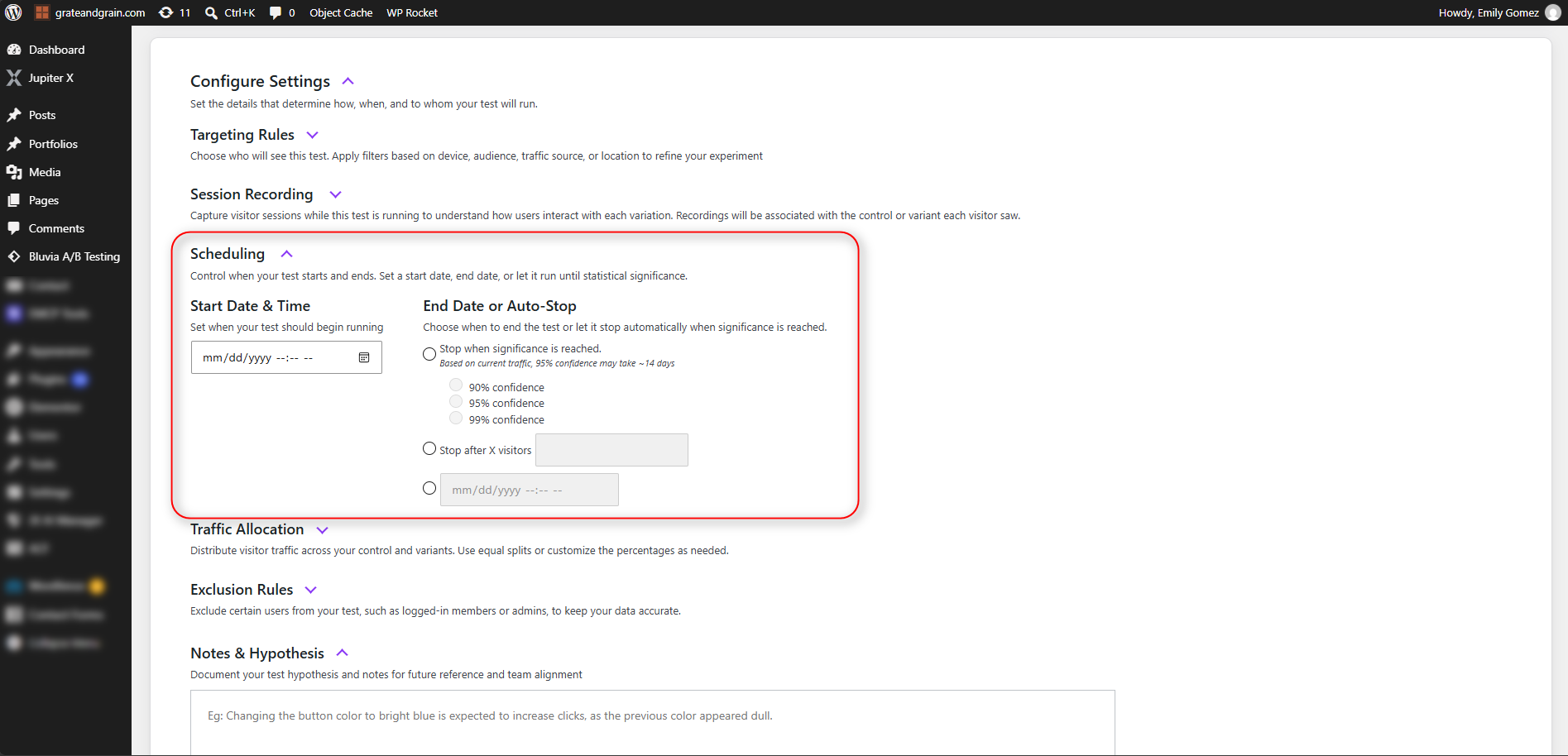
When scheduling an experiment, you can define when the test should begin and when it should end.
- Start Date & Time — Determines when the experiment is scheduled to begin.
- End Date & Time — Determines when the experiment is scheduled to stop.
Once scheduled, Bluvia A/B Testing automatically manages the experiment according to the configured dates and times.
A scheduled experiment remains inactive until its start time is reached.
When the scheduled end time is reached, the experiment stops collecting new data and its results remain available for review.
Plan Availability
Test Scheduling is available exclusively with the Bluvia A/B Testing Automate plan.
The Automate plan allows you to schedule experiments to start and stop automatically at specified dates and times.
If you’re using the Core Plugin or a plan that does not include Automate, you’ll need to start and stop experiments manually.
See Free vs. Paid Plans for more information about available features.
How to Schedule an Experiment
To schedule a new experiment:
- Open Bluvia A/B Testing in your WordPress dashboard.
- Create a new experiment or open an existing Draft.
- Configure your Control, Variants, and conversion goal.
- Open the experiment’s Settings.
- Locate the scheduling options.
- Set the desired Start Date & Time.
- Set the desired End Date & Time, if you want the experiment to stop automatically.
- Review your experiment settings.
- Save and schedule the experiment.
The experiment will appear with a Scheduled status until its start time is reached.
For more information about configuring an experiment, see Experiment Settings.
Understanding Experiment Statuses
Scheduling affects the status of an experiment throughout its lifecycle.
You can find scheduled experiments in the Test Library by selecting the Scheduled filter.
Editing a Scheduled Experiment
Before a scheduled experiment begins, you may need to update its configuration or change its scheduled dates.
To make changes:
- Open Test Library.
- Select the Scheduled filter.
- Locate the experiment.
- Open the experiment for editing.
- Update the necessary settings.
- Save your changes.
Review the scheduled start and end times after making changes to ensure they still match your intended testing period.
Important: Editing an experiment that is already Active will pause it. If you need to change a running experiment, consider how that interruption may affect the results.
Scheduling an End Date
Setting an end date is useful when an experiment needs to finish at a specific time, such as the end of a promotional campaign.
However, an experiment’s scheduled end date does not guarantee that it will collect enough data to produce statistically reliable results.
If traffic is lower than expected, the experiment may reach its end date without achieving the desired confidence level.
For experiments focused on identifying a statistically reliable winner, consider allowing enough time for the required sample size and confidence level to be reached.
Best Practices for Scheduling Tests
- Allow enough time to collect data. Avoid scheduling experiments for periods that are too short to produce meaningful results.
- Consider traffic patterns. Weekdays, weekends, holidays, and promotions can affect visitor behavior.
- Preview before scheduling. Confirm that your Control and Variants display correctly before the experiment begins.
- Avoid overlapping experiments. Multiple experiments can run simultaneously, but avoid testing changes that affect the same content or visitor experience.
- Review results after completion. A scheduled end date does not automatically mean that a winning Variant has been identified.
What Happens After a Scheduled Test Ends?
When an experiment reaches its scheduled end time, it stops running and no longer collects new experiment data.
The results remain available in Bluvia A/B Testing so you can review performance and determine whether a Variant performed better than the Control.
Stopping an experiment does not automatically mean a winner has been selected or applied to your website.
Review the results before deciding whether to implement a winning Variant.